A fast-loading Shopify store isn’t just a nice-to-have — in 2026, it’s one of the most important factors that determine your conversion rate, SEO ranking, user experience, and overall revenue. If you run a Shopify store, you may be seeking ways to optimize your shopify store speed. In the world of e-commerce, speed is crucial. A slow-loading website leads to a high bounce rate, less traffic, low user engagement and thus, a diverse impact on your sales.
This guide explains why speed matters and shares the best practices to make your Shopify store faster and smoother to drive sales.
Why Shopify Store Speed Matters?
In the world of eCommerce, every second counts — literally. When a customer visits your Shopify store, speed becomes the very first impression they experience. A fast-loading store feels smooth, professional, and trustworthy, while even a few seconds of delay can frustrate shoppers and push them toward competitors. This is why optimizing your Shopify store speed isn’t just a technical task; it’s a powerful business strategy that influences sales, user experience, and long-term growth.
First Impressions Happen in Seconds
Studies show that users decide within 2–3 seconds whether they want to continue browsing a website. If your Shopify store loads slowly, visitors are likely to abandon the page before even seeing your products. A fast store ensures customers stay engaged and explore what you offer.
Store Speed Directly Impacts Conversions
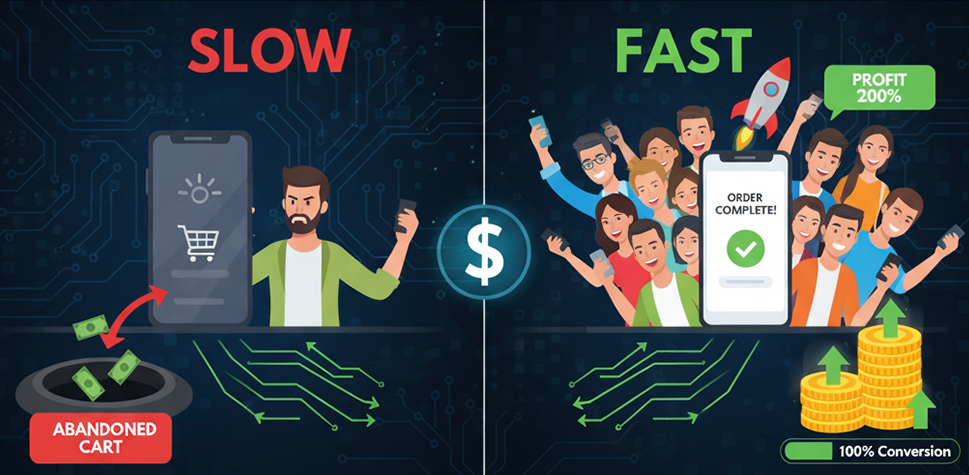
The slower the website, the fewer the conversions. Fast stores create a smooth buying journey — from browsing to checkout. When shoppers don’t face interruptions or lag, they’re more likely to complete their purchase. Even a 1-second improvement in page load time can significantly boost conversion rates.
Better SEO and Higher Google Rankings
Google uses site speed as a ranking factor. Faster websites not only deliver a better experience but are also more likely to appear higher on search results. This means improved visibility, more organic traffic, and lower customer acquisition costs. If you want your Shopify store to compete in search, speed optimization is essential.
Reduced Bounce Rates
Bounce rate measures how many visitors leave your site without interacting. Slow speed is one of the biggest reasons for high bounce rates. When your store loads quickly, more visitors stay on the site, browse multiple pages, and move closer to making a purchase. This leads to higher engagement and better overall performance.

Shopify store speed affects every core aspect of your online business — from conversions and SEO to user experience and brand reputation. Investing in speed optimization is not just about improving performance; it’s about delivering a better shopping experience that turns visitors into loyal customers.
How to Improve Your Shopify Store Speed: A Complete Step-by-Step Guide
Optimizing performance doesn’t require technical coding knowledge — just the right steps done correctly. Here’s a complete guide to help you speed up your Shopify store in 2026 and beyond.
Choose a Lightweight, High-Performance Theme
Your Shopify theme serves as the foundation of your store’s performance. If you choose a heavy theme packed with unnecessary scripts and bloated features, it can slow down your entire site. To ensure better speed and smoother browsing, opt for a modern, performance-optimized theme such as Avone, Prestige, Dawn, Revone, or Impulse. Avoid themes overloaded with animations or large libraries that add unnecessary weight. Before finalizing your purchase, always test the theme’s speed using Shopify Speed Insights to make an informed decision.
Compress and Optimize Product Images
Compressing and optimizing your product images is one of the simplest yet most powerful ways to boost your Shopify store’s speed. Large, uncompressed images slow down page loading and negatively impact user experience, especially on mobile. By reducing file sizes without compromising quality, your store loads faster, feels smoother, and keeps customers engaged.
Best practices:
- Use WebP instead of JPG/PNG for smaller file sizes.
- Compress images with tools like TinyPNG, Tinyimg, or Shopify’s built-in compression.
- Keep hero images under 150 KB and product images under 200 KB.
- Use correct dimensions—never upload 3000px images when 1500px is enough.
Minimize Third-Party Apps
Every additional app adds extra scripts, styles, and background processes that slow down your site’s loading speed. Many apps inject code into your theme, increasing page weight and creating more network requests — which directly impacts performance
Action steps:
- Delete apps you are not actively using (don’t just disable them).
- Replace multiple apps with one multifunctional app where possible.
- Prefer apps that support app embeds instead of code injections.
- Use theme features instead of apps whenever possible (slideshows, popups, upsells, reviews).
Remove Old App Code Left Behind
Even after uninstalling apps, leftover code stays in your theme files.
How to fix:
- Go to Online Store → Themes → Edit Code
- Look for old JS/CSS from deleted apps inside:
- theme.liquid
- product.liquid
- cart.liquid
- Remove unnecessary snippets (or ask a developer if unsure).
This alone can drastically improve load time.

Enable Lazy Loading for Images & Videos
Lazy loading ensures images load only when they appear on screen — As a result, your store feels faster, pages open quickly even on slower connections, and customers can start browsing without waiting for large media files to download
What to do:
- Most modern Shopify themes already support lazy loading.
- Avoid embedding YouTube videos directly — use thumbnail preview instead.
Optimize Your Homepage Layout
Your homepage must be fast and clean — not overloaded. It sets the first impression and directly influences how quickly visitors engage with your store.
Do this:
- Avoid long slideshows — use 1 or 2 hero banners max.
- Avoid stacking too many large images
- Reduce number of sections.
- Avoid loading too many product collections at once.
- Limit homepage videos.
- Make sure all images are compressed, use lazy loading, and disable unnecessary animations.
Remember: The shorter the page, the faster the load.
Use Shopify’s Built-In Features Over External Ones
Shopify now offers a wide range of performance-optimized, built-in tools—so you no longer need to rely on heavy third-party apps for most essential features. Always choose a theme that includes the important built-in functionalities you need, rather than adding external apps that slow down your store. This ensures faster load times, better stability, and a smoother customer experience. You can explore themes that offer these built-in features here. Fewer apps = faster store.
Optimize Fonts
Custom fonts can reduce speed if not optimized.
Tips:
- Use system fonts when possible (fastest).
- Use Google Fonts Or Choose inbuit Shopify Fonts, limit to max 2 fonts.
- Preload the most important font using theme settings.
Reduce Liquid Render Time
Heavy Shopify sections or complex queries slow render time.
Improve render speed by:
- Reducing loops and complex dynamic blocks
- Keeping fewer blocks per section
- Using metafields efficiently
- Avoiding unnecessary liquid conditions
Avoid Too Many Popups, Trackers & Widgets
Avoid using too many popups, trackers, and widgets, as they can significantly slow down your Shopify store. Marketing tools like chat widgets, heatmaps, tracking pixels, and popup apps add extra scripts that hurt performance. Keep only the tools that you genuinely need for your business, and remove anything that doesn’t directly contribute to conversions or customer experience.
Test your Speed Regularly
Test your store’s speed regularly because you can’t improve what you don’t measure. Use tools like Google PageSpeed Insights, GTMetrix, and WebPageTest to understand how your store is performing. Make sure to run tests after every major change—such as installing a new app, updating your theme, or modifying key sections—to ensure your site stays fast and optimized.
Conclusion
Improving Shopify store speed isn’t a one-time task — it’s an ongoing optimization process. By choosing a lightweight theme, reducing apps, optimizing images, and keeping your layout clean, you can dramatically improve loading time and boost conversions.