Adorn ThemesAdorn ThemesAdorn Themes
  • Services
  • Themes
    • Avone
    • Revone
    • Vogal
    • Optimal
    • Belle
  • Portfolio
  • Support
    • Open Ticket
    • Knowledge Base
    • Theme Documention
  • Blog
    • Shopify Themes
    • Shopify Apps
    • Ecommerce
    • SEO
  • About us
  • Contact us
Create a Free Store Button

How can we help you?

Theme Installation

  • Install Theme
  • Recommended Apps
  • Changelog

Theme Settings

  • Color swatches trigger
  • Basic Configuration
  • Layout
  • General
  • Typography & Colors
  • Header Menu
  • Cart
  • Search
  • Products Grid
  • Scrolling Text – Products Grid
  • Product Swatches
  • Size Chart
  • Currency & Language
  • Social Media
  • Quickview Popup
  • Animations
  • Age Verification Popup

General Sections

  • Page Sections
  • Header Group
  • Footer Group
  • Overlay Group

Navigation

  • Header Menu
  • Set Menu Labels
  • Show links in Megamenu without column title?

Collection Page

  • Collection Page Banner
  • Sub Collections
  • Custom image for collections
  • Add product colors using category metafields
  • Collection Main
  • Set custom labels for products
  • Limit color swatch on products grid
  • Scrolling Text – Products Grid

Product Page

  • Color swatches trigger
  • Set custom labels for products
  • Design Product Page
  • Add product colors using category metafields
  • More Color Products
  • Size Chart trigger
  • How to set size chart?
  • Set product pre-order for shopify 2.0
  • Related products section
  • Add product descriptions with columns.
  • Add external product link?

Page Setup

  • About Us
  • Contact Us
  • FAQs
  • Brands List
  • Lookbook
  • Store Locations
  • Wishlist
  • Blog
  • Create Custom Page and add sections?
  • Cart

Blog Pages

  • Blog
  • Blog Banner

FAQs

  • Set product pre-order for shopify 2.0
View Categories
  • Home
  • Knowledge Base
  • NexGeek Shopify Theme
  • Theme Settings
  • Currency & Language

Currency & Language

Enable options and adjust the settings to display Currency & Language on your store.

In the theme editor, click Theme settings -> Currency & Language

Please downloads flags icons and upload from your store admin -> Content -> Files -> Upload files

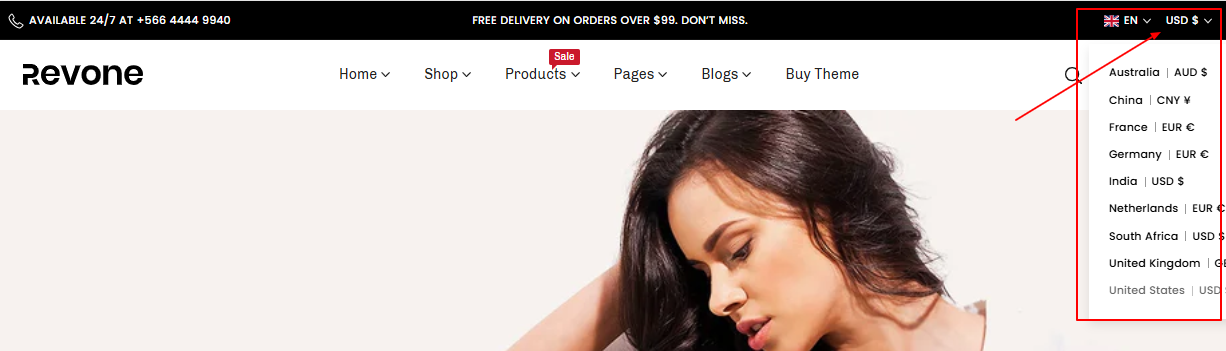
Currency  #

Show Currency? Enable to display currency conversion on your store

Currency Manage by: Choose currency display by Shopify default or AdornThemes

Enable Auto currency switcher: Enable auto changed currency based on country.

Supported currencies: add supported currencies name here.

Show currency codes: Show currency code with product price.

Show Flag? Display country flag with currency conversion dropdown.

Language #
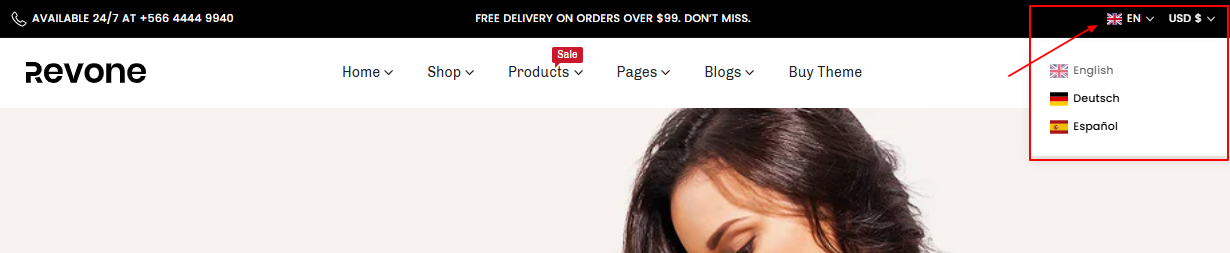
Show Language? Enable to display language select menu on your store

Language Manage by Choose which app to use. Both are paid. We are weglot partner and you will get 20% OFF for weglot app.

Show Flag? Display country flag with language menu.

Default Language: Add default language name for your store.

Choose Language menu for Weglot: Create and select language menu for weglot app.

Appearance: Set dropdown text and background color.

What are your Feelings
Table of Contents
  • Currency 
  • Language
Adorn Themes

We build premium shopify themes. Our themes are adored by thousands of merchants for their user-friendly nature, powerful features, reliable performance, and exceptional user interface

Information
  • About Us
  • Contact Us
  • Our Services
  • Our Partners
  • Our Blogs
Customer support
  • Support Ticket
  • Knowledge Base
  • FAQ’s
  • Need Customization?
  • Project Request?
WHY CHOOSE ADORNTHEMES
footer-logo-1
shopify-partner--logo
© 2025 AdornThemes - All Rights Reserved.
  • Social Media
  • Social Media
  • Social Media