Adorn ThemesAdorn ThemesAdorn Themes
  • Services
  • Themes
    • Avone
    • Revone
    • Vogal
    • Optimal
    • Belle
  • Portfolio
  • Support
    • Open Ticket
    • Knowledge Base
    • Theme Documention
  • Blog
    • Shopify Themes
    • Shopify Apps
    • Ecommerce
    • SEO
  • About us
  • Contact us
Create a Free Store Button

How can we help you?

Theme Installation

  • Install Theme
  • Recommended Apps
  • Changelog

Theme Settings

  • Color swatches trigger
  • Basic Configuration
  • Layout
  • General
  • Typography & Colors
  • Header Menu
  • Cart
  • Search
  • Products Grid
  • Scrolling Text – Products Grid
  • Product Swatches
  • Size Chart
  • Currency & Language
  • Social Media
  • Quickview Popup
  • Animations
  • Age Verification Popup

General Sections

  • Page Sections
  • Header Group
  • Footer Group
  • Overlay Group

Navigation

  • Header Menu
  • Set Menu Labels
  • Show links in Megamenu without column title?

Collection Page

  • Collection Page Banner
  • Sub Collections
  • Custom image for collections
  • Add product colors using category metafields
  • Collection Main
  • Set custom labels for products
  • Limit color swatch on products grid
  • Scrolling Text – Products Grid

Product Page

  • Color swatches trigger
  • Set custom labels for products
  • Design Product Page
  • Add product colors using category metafields
  • More Color Products
  • Size Chart trigger
  • How to set size chart?
  • Set product pre-order for shopify 2.0
  • Related products section
  • Add product descriptions with columns.
  • Add external product link?

Page Setup

  • About Us
  • Contact Us
  • FAQs
  • Brands List
  • Lookbook
  • Store Locations
  • Wishlist
  • Blog
  • Create Custom Page and add sections?
  • Cart

Blog Pages

  • Blog
  • Blog Banner

FAQs

  • Set product pre-order for shopify 2.0
View Categories
  • Home
  • Knowledge Base
  • NexGeek Shopify Theme
  • Theme Settings
  • General

General

Set several global settings for your layout.

In the theme editor, click Theme settings -> General

Enable Prevent Copying? : Stop anyone from taking the material and photos from your website. If this option is enabled, users cannot directly steal content from your store.

Enable RTL : Text direction from right to left. When you enable this option from theme, all content from your store layout will display from right to left.

Catalog Mode : By turning on this setting, you can show product catalogues on your store without allowing customers to purchase them. So this option will hide Add to cart buttons and cart icon.

My Account : Select icon for User login.

Wishlist : “Enable Wishlist” feature allows users to add items to a wishlist page on your store. Please create a wishlist page and select it from the options provided here.

Favicon image : Upload favicon icon image. The small icon at the top of your browser window is called favicon.

A favicon should be 16×16 pixels or 32×32 pixels in size. When you upload your favicon file to Shopify, it will be shrunk to 32×32 pixels if it is too large.

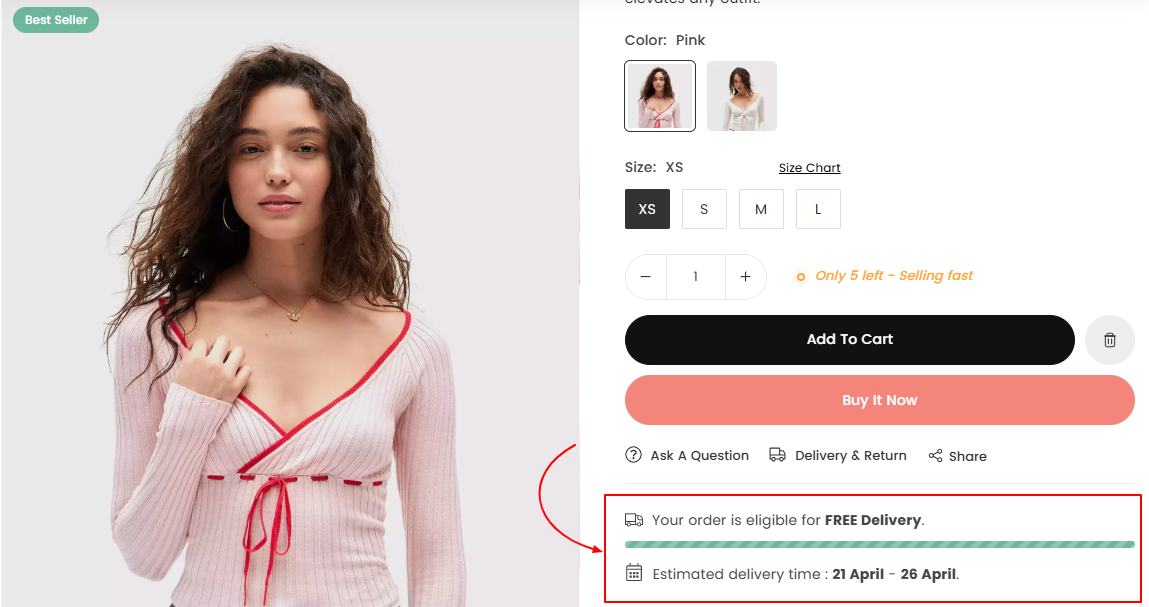
Free Shipping Message: Set price and message to offer free shipping. Also adjust options for colors and icons.

  • Free shipping amount : Set price to offer free shipping
  • Free Shipping Message : Show buyers how much is left for free shipping. i.e. Spent [price] more to get free shipping ( You must include [price] in message)
  • Free Shipping Claim Message : Message that will display to buyers when get eligible for free shipping. i.e. Congratulations! You are eligible for free shipping on your order.
Terms and Conditions Checkbox : Enabling this option will display a terms checkbox preceding the buy now button on the product page.

Newsletter Custom Code : Add app code here If you are using third party app for the newsletter.

Scroll to Top Button : Add scroll-to-top button in the footer of your store, allowing users to easily return to the top without having to scroll unnecessarily.

Home page SEO Data :Meta keywords are meta tags that you can add to give search engines more information about a page’s content. You should research and enter the keywords for your store.

Write the name of Author for shop in Shop Author Name.

Dynamic Browser Tab Title : By choosing this option, the title of the browser tab will change alternately whenever a user navigates between tabs. This strategy can effectively capture customers’ attention and encourage them to return to your store.


What are your Feelings
Adorn Themes

We build premium shopify themes. Our themes are adored by thousands of merchants for their user-friendly nature, powerful features, reliable performance, and exceptional user interface

Information
  • About Us
  • Contact Us
  • Our Services
  • Our Partners
  • Our Blogs
Customer support
  • Support Ticket
  • Knowledge Base
  • FAQ’s
  • Need Customization?
  • Project Request?
WHY CHOOSE ADORNTHEMES
footer-logo-1
shopify-partner--logo
© 2025 AdornThemes - All Rights Reserved.
  • Social Media
  • Social Media
  • Social Media