Adorn ThemesAdorn ThemesAdorn Themes
  • Services
  • Themes
    • Avone
    • Revone
    • Vogal
    • Optimal
    • Belle
  • Portfolio
  • Support
    • Open Ticket
    • Knowledge Base
    • Theme Documention
  • Blog
    • Shopify Themes
    • Shopify Apps
    • Ecommerce
    • SEO
  • About us
  • Contact us
Create a Free Store Button

How can we help you?

Theme Installation

  • Install Theme
  • Recommended Apps
  • Changelog

Theme Settings

  • Color swatches trigger
  • Basic Configuration
  • Layout
  • General
  • Typography & Colors
  • Header Menu
  • Cart
  • Search
  • Products Grid
  • Scrolling Text – Products Grid
  • Product Swatches
  • Size Chart
  • Currency & Language
  • Social Media
  • Quickview Popup
  • Animations
  • Age Verification Popup

General Sections

  • Page Sections
  • Header Group
  • Footer Group
  • Overlay Group

Navigation

  • Header Menu
  • Set Menu Labels
  • Show links in Megamenu without column title?

Collection Page

  • Collection Page Banner
  • Sub Collections
  • Custom image for collections
  • Add product colors using category metafields
  • Collection Main
  • Set custom labels for products
  • Limit color swatch on products grid
  • Scrolling Text – Products Grid

Product Page

  • Color swatches trigger
  • Set custom labels for products
  • Design Product Page
  • Add product colors using category metafields
  • More Color Products
  • Size Chart trigger
  • How to set size chart?
  • Set product pre-order for shopify 2.0
  • Related products section
  • Add product descriptions with columns.
  • Add external product link?

Page Setup

  • About Us
  • Contact Us
  • FAQs
  • Brands List
  • Lookbook
  • Store Locations
  • Wishlist
  • Blog
  • Create Custom Page and add sections?
  • Cart

Blog Pages

  • Blog
  • Blog Banner

FAQs

  • Set product pre-order for shopify 2.0
View Categories
  • Home
  • Knowledge Base
  • NexGeek Shopify Theme
  • Theme Settings
  • Basic Configuration

Basic Configuration

Enable Customer Accounts #

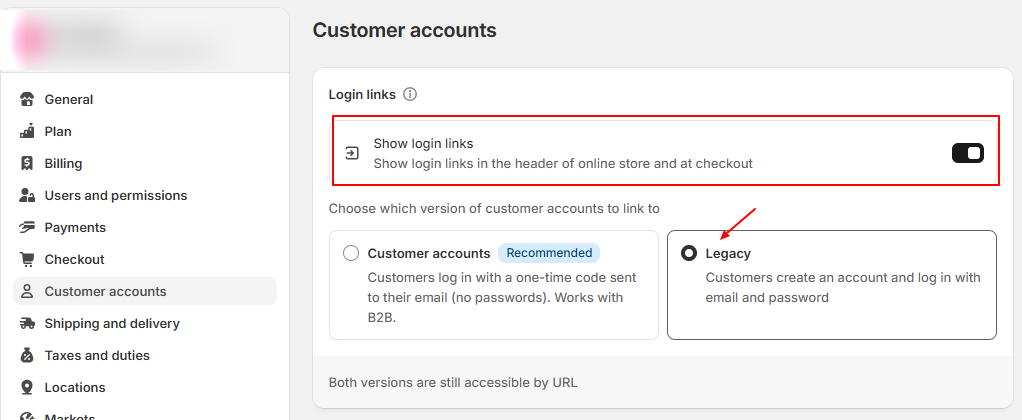
Customer accounts let your customers log in to view their orders, profile information, and saved addresses. When a customer logs in, the details stored in their account are auto-filled during checkout for a faster checkout experience. Please read more in shopify well written detailed article

✅
Steps :
  1. From your shopify store Admin -> Click Settings -> Locate Customer accounts
  2. Enable Show login links
  3. choose Legacy customer account

Set Up Shipping Rates #

For businesses with multiple locations, you can set shipping rates per location within each shipping profile for greater control over your shipping costs

To set up shipping rate, Please go to your shopify store Admin -> Click Settings -> Locate Shipping and delivery.

Now configure your shipping rates by following this article by shopify

Currency Settings #

Follow these steps only if you have chosen Adornthemes currency from Theme Settings,

✅
Steps :
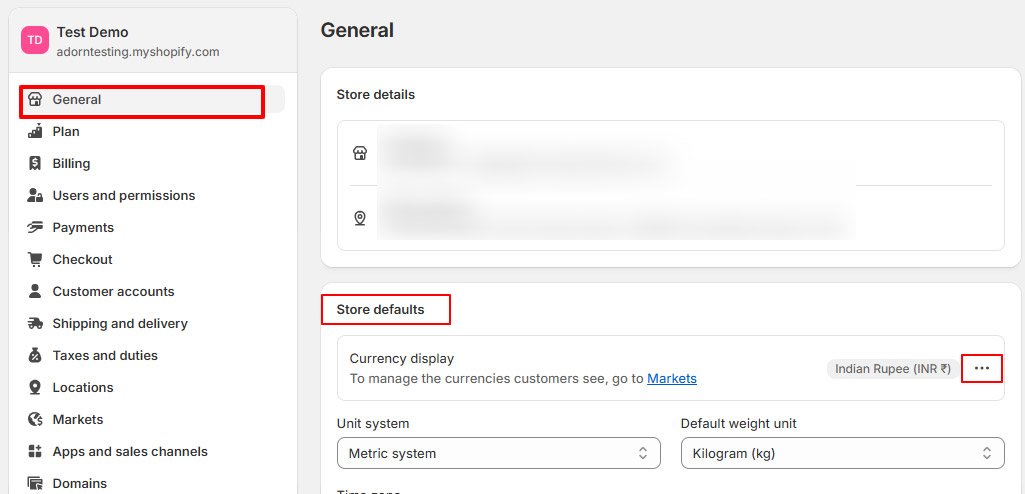
  1. From your shopify Store Admin -> Click Settings -> General -> Locate Store defaults
  2. Click on Dots inline with Currency display
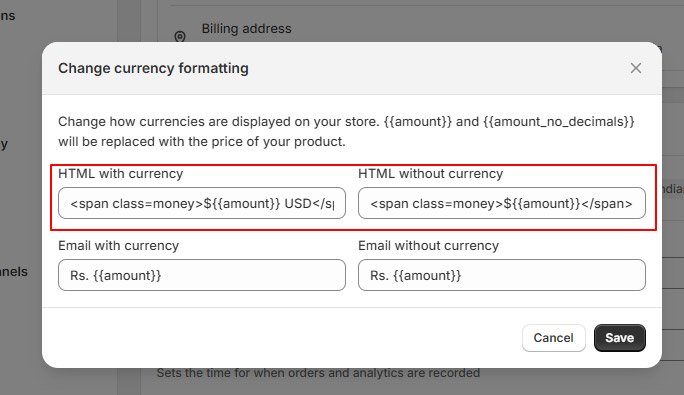
  3. Click on Change currency formatting
  4. Update below fields

HTML with currency to

<span class=money>${{amount}} USD</span>

HTML without currency to

<span class=money>${{amount}}</span>
What are your Feelings
Table of Contents
  • Enable Customer Accounts
  • Set Up Shipping Rates
  • Currency Settings
Adorn Themes

We build premium shopify themes. Our themes are adored by thousands of merchants for their user-friendly nature, powerful features, reliable performance, and exceptional user interface

Information
  • About Us
  • Contact Us
  • Our Services
  • Our Partners
  • Our Blogs
Customer support
  • Support Ticket
  • Knowledge Base
  • FAQ’s
  • Need Customization?
  • Project Request?
WHY CHOOSE ADORNTHEMES
footer-logo-1
shopify-partner--logo
© 2025 AdornThemes - All Rights Reserved.
  • Social Media
  • Social Media
  • Social Media