In the sub collection list section on collection page, an custom image is used. The metafields option is used to makes it work. Follow the steps below to configure it.
Step 1 :
From your shopify store admin > click "Settings" > Metafields and metaobjects > collections > Add definition
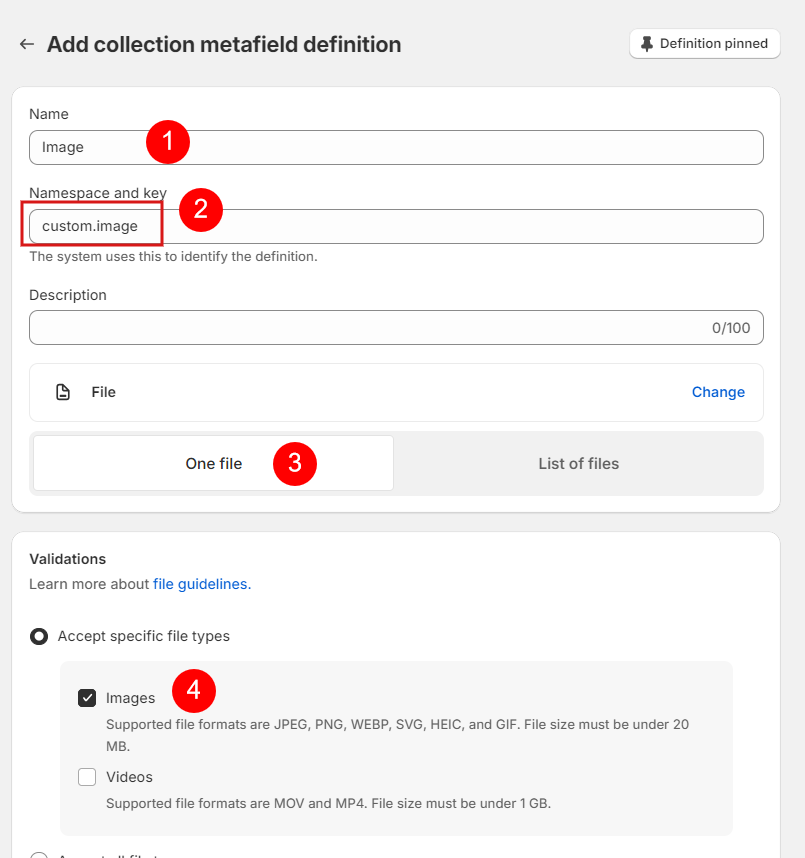
Step 2 : Fill in the details as shown in the screenshot below.
Name : Image
Namespace and key : custom.image (must)
Step 3 : Go to the collection and Navigate to the metafield section at the bottom.
Step 4 : Click Image field to select image and save page.