This article required for theme version 4.x or below.
Please follow the given step in order to create a sub-collection within a collection page
Let’s create sub collections Tops, Bottoms, Beachwear and Dresses for Clothing Collection page.
Step 1 : Open or Create the collection page you wish to view the sub collection list on.
Next, choose the “collection.sub-collections” template file from the collection template dropdown.

Step 2 : Now Go to “online store > Navigation” and Add menu with same name as collection name. Like “Clothing“. Add menu items and select all sub collection.
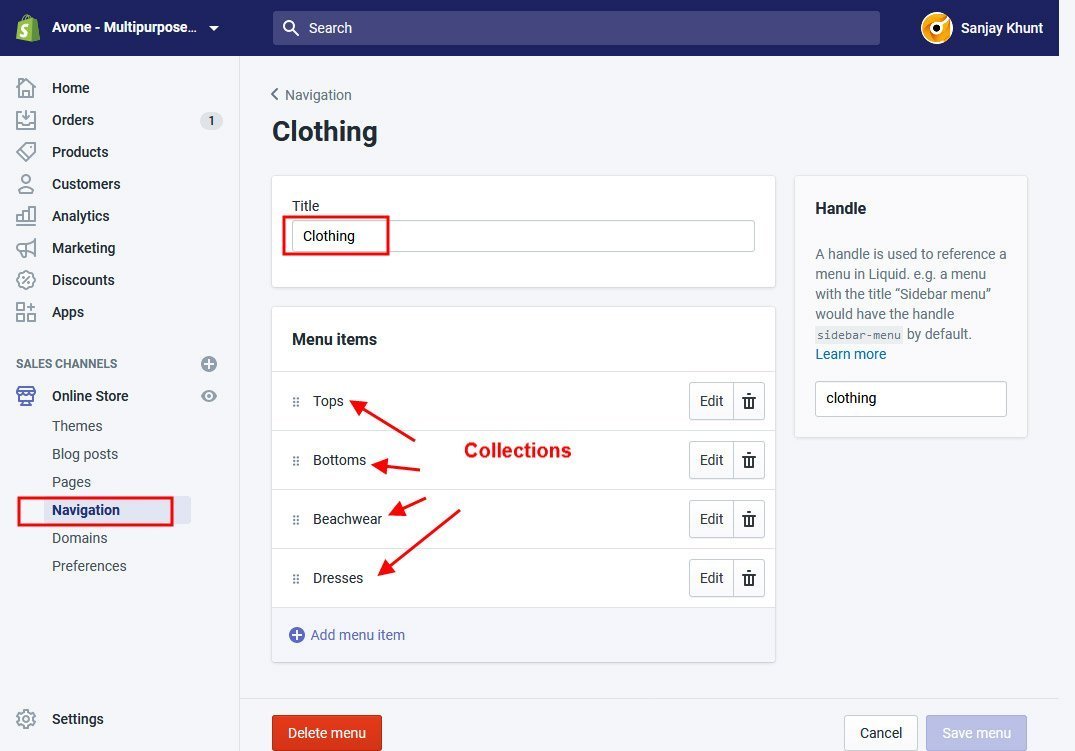
Note: Later, You can change main collection name or menu name but collection handle and menu handle name must be same.

Result Page


