This article is here to help you with a step-by-step guide on how to easily find your purchase code and download your license certificate.
Purchase Code from Themeforest #
1) Log into your Envato Market account.
2) Hover your mouse over your username at the top of the screen.
3) Click ‘Downloads’ from the drop-down menu.

4) Click ‘Download’ next to the item for which you need the purchase code.

5) Click ‘License certificate & purchase code’ (available as PDF or text file).

Here is an example of a PDF License certificate and purchase code:

Purchase Code from AdornThemes #
Step 1: Visit AdornThemes.com.
Step 2: Click the Login icon in the top-right corner.
Step 3: Sign in using your AdornThemes account credentials.
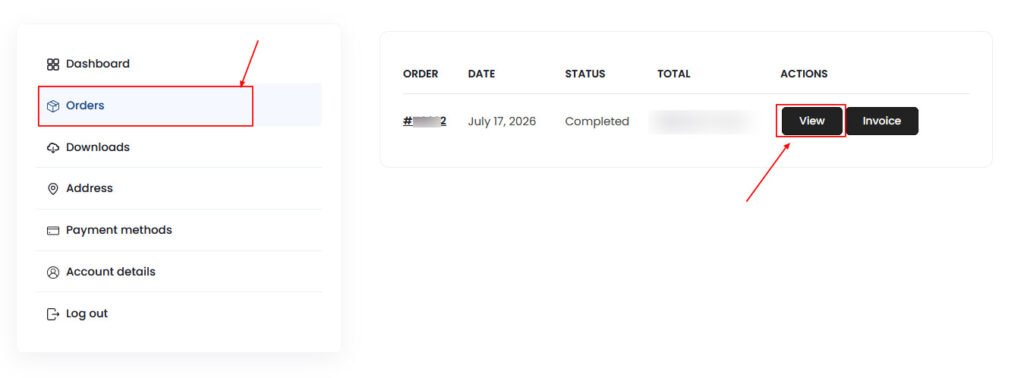
Step 4: Click Orders from left column. Locate your order and click View.
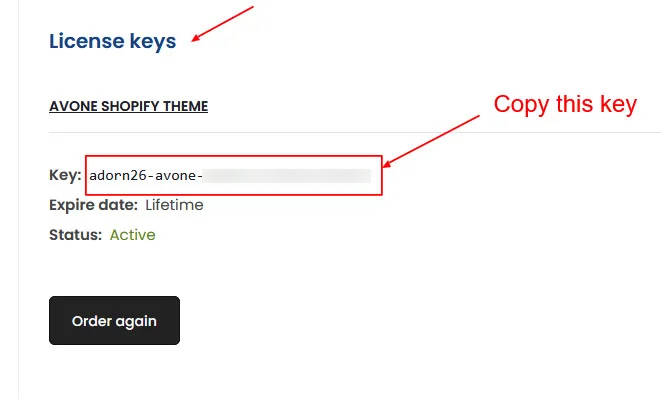
Step 5: Scroll down to the License Key section and Copy your Key