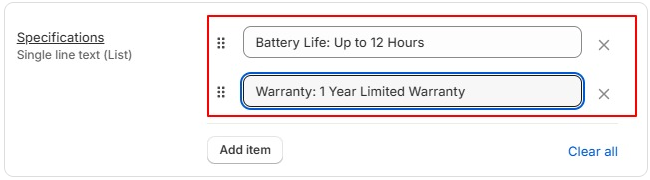
The Specifications metafield allows you to display additional product details such as dimensions, material, weight, compatibility, warranty, and more in the Product Comparison table. This makes it easier for customers to compare products side by side.
Step 1:
Go to Store Admin –> Settings –> Metafields and metaobjects –> Products > Add definition
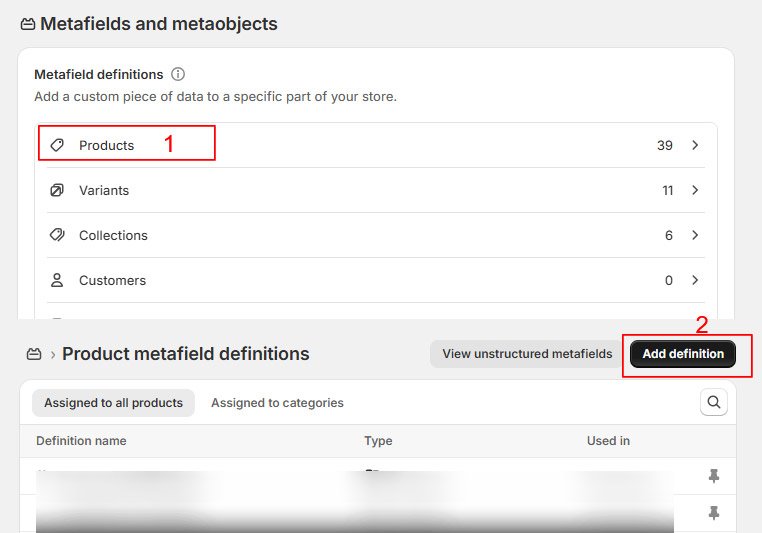
Step 2: Fill in the metafield details as follows:
| Name : Specifications |
Namespace and key : custom.specifications |
| Type: Must be “List of Single line text”, |
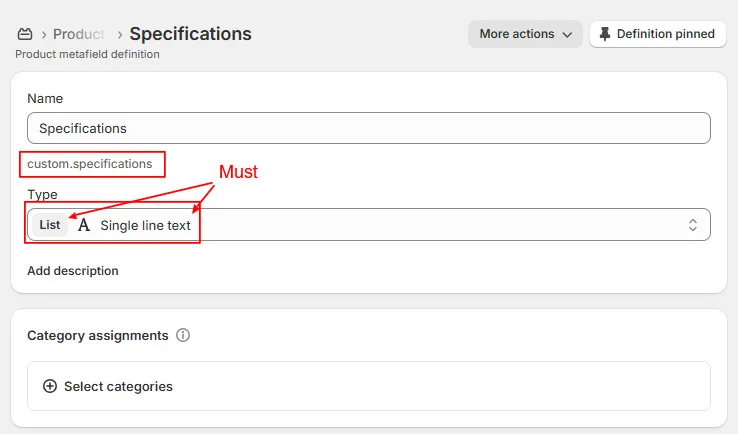
Save the Metafield.
Step 3: Add Specifications to Your Products
- Go to Store Admin → Products.
- Open the product you want to edit.
- Scroll down to the Metafields section.
- Locate the Specifications metafield.
Enter your product specifications and click Save. You can include details such as:
Country of Origin: China
Material: 100% Cotton
Weight: 450 g
Dimensions: 30 × 20 × 10 cm
Warranty: 1 Year
Use colon “:” to separate label and value.