Product Short Description #
From your shopify store admin –> Settings –> Metafields and metaobjects –> Products
Now click on “Add definition” button and Select content type as below

Now go to your products and Scroll down to “Metafields”, Add text in short description and Click Save

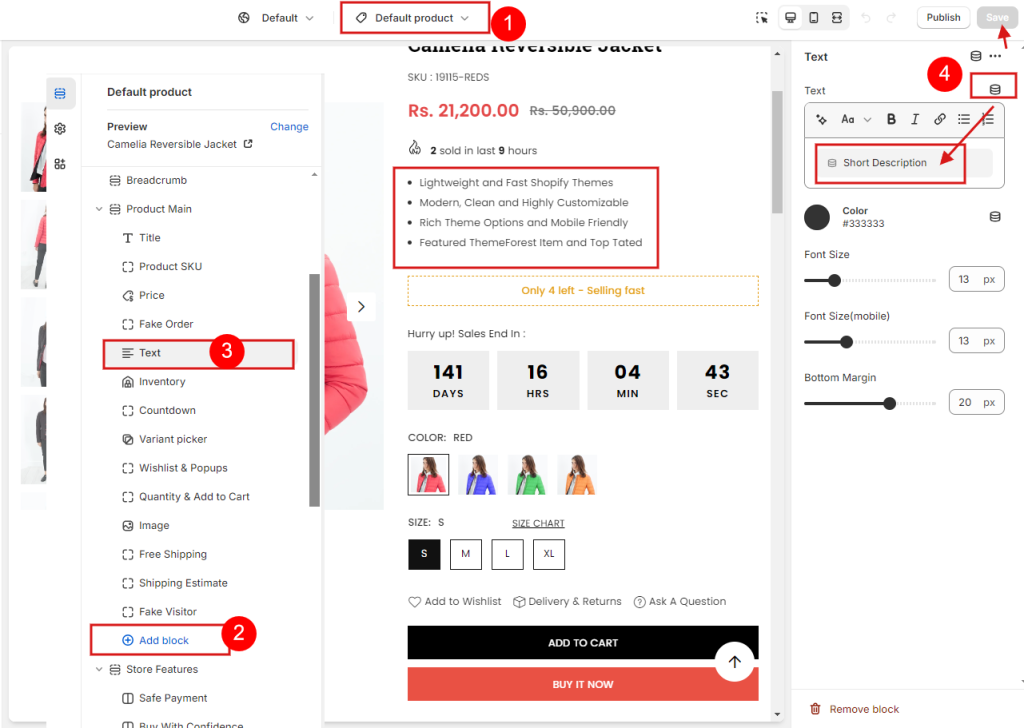
Now go to product page from theme customize -> Add Text block -> Select metafield short description and click save. Drag and Drop block position to display at desire position.
Product Countdown #
From your shopify store admin –> Click "Settings" –> Metafields and metaobjects –> Click Products
Click on “Add definition” and add data as below
Name: Countdown
Namespace and Key: my_fields.countdown
Content type: Date and Time( Select Date )

Now go to your products and Scroll down to “Metafields” and Select Date from Countdown field and click save.

Product Size Chart #
From your store admin –> Click "Settings" –> Metafields and metaobjects –> Click Products
Click on “Add definition” and add data as below
Name: Size Chart
Namespace and Key: my_fields.sizechart
Content type:Text ( Select Multi-line text )

Now go to your products and Scroll down to “Metafields” and Add data in Size chart field

If you don’t add data here, global data will appear in page (same data for all products). You can read this above in Product Tabs section.