Adorn ThemesAdorn ThemesAdorn Themes
  • Services
  • Themes
    • Avone
    • Revone
    • Vogal
    • Optimal
    • Belle
  • Portfolio
  • Support
    • Open Ticket
    • Knowledge Base
    • Theme Documention
  • Blog
    • Shopify Themes
    • Shopify Apps
    • Ecommerce
    • SEO
  • About us
  • Contact us
Create a Free Store Button

How can we help you?

Theme Installation

  • Avone – How to install theme?
  • Avone Theme Update – Release Notes.
  • Avone – How to update your shopify theme?

Theme Settings

  • How to set free shipping?

Navigation

  • How to use Megamenu Navigation
  • How to display images for mobile menu items?

Collection Page

  • How to set product labels?
  • Set Collection banners, Short description and Countdown by metafields.
  • Collection Page – How to set product filters ?
  • Icon image for collection

Product Page

  • How to set product labels?
  • Add different size chart for each product?
  • Product Page – Product Swatches – Product Variants
  • Set product pre-order for shopify 2.0
  • Related products section
  • Display Complete the look products
  • Display different tab details for each product
  • How to add product custom option?
  • How to display FAQs tab on product detail page?
  • How to set upsell product bundle
  • Add product descriptions with columns.
  • How to display product specification tab on product page?
  • How to display color variant media gallery?

Page Setup

  • Create Custom Page and add sections?
  • How to create Landing page?
  • How to create metafield for page banner

Blog Pages

  • How to show specific product list in blog article page

FAQs

  • Set product pre-order for shopify 2.0
View Categories
  • Home
  • Knowledge Base
  • Avone Shopify Theme
  • Product Page
  • Add product descriptions with columns.

Add product descriptions with columns.

Only works for large view desktop mode.

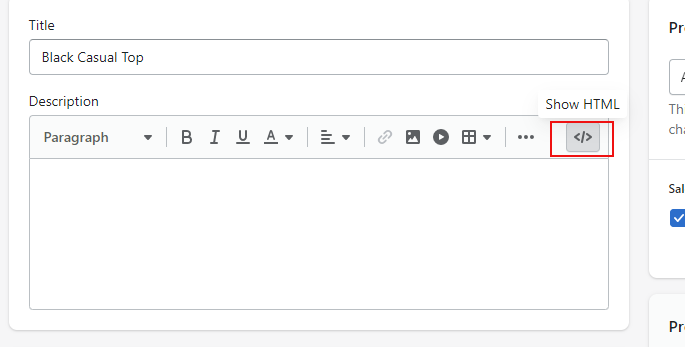
Step 1: Go to products, select product and click on “Show HTML” icon.
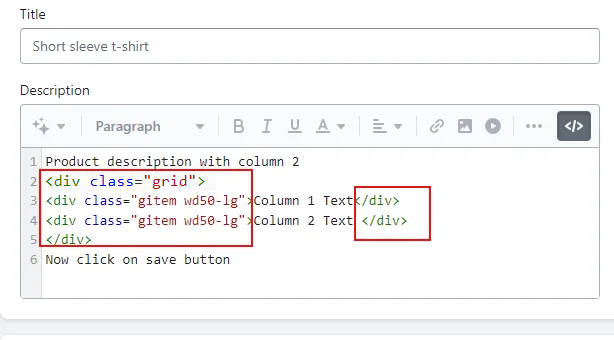
Step 2: To add product description in 2 columns, do as below. you need to add class as highlighted

Parent class name is grid and child class name is gitem wd50-lg
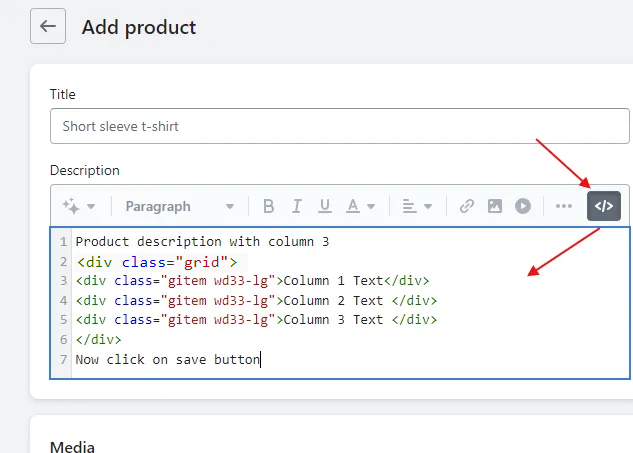
Step 3: Add product description in 3 columns

Parent class name is grid and child class name is gitem wd33-lg
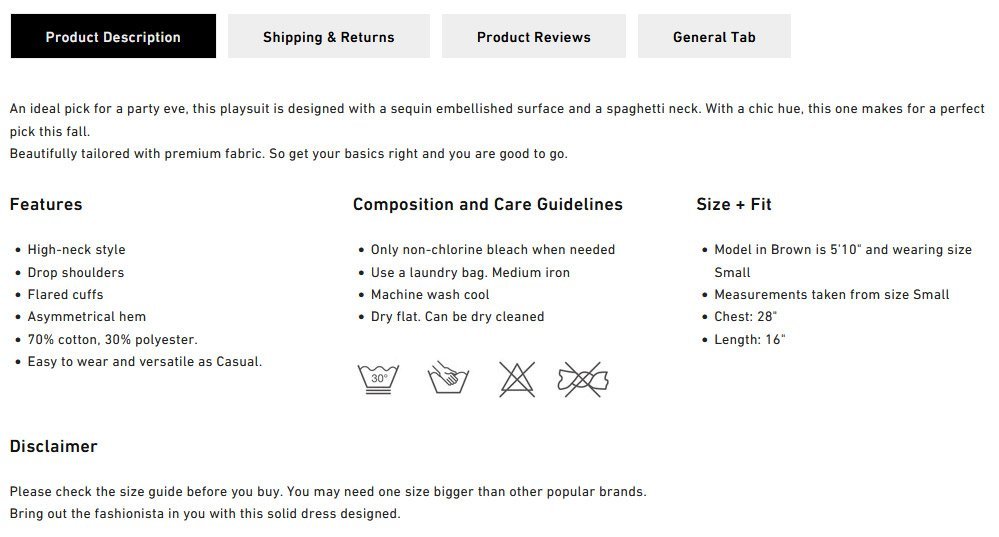
3 Columns preview from demo
What are your Feelings
Adorn Themes

We build premium shopify themes. Our themes are adored by thousands of merchants for their user-friendly nature, powerful features, reliable performance, and exceptional user interface

Information
  • About Us
  • Contact Us
  • Our Services
  • Our Partners
  • Our Blogs
Customer support
  • Support Ticket
  • Knowledge Base
  • FAQ’s
  • Need Customization?
  • Project Request?
WHY CHOOSE ADORNTHEMES
footer-logo-1
shopify-partner--logo
© 2025 AdornThemes - All Rights Reserved.
  • Social Media
  • Social Media
  • Social Media