Set banner image #
Go to store admin > Settings > Metafields & Metaobjects > Pages > Add definition
Follow the steps given below to set metafields for image to each page.
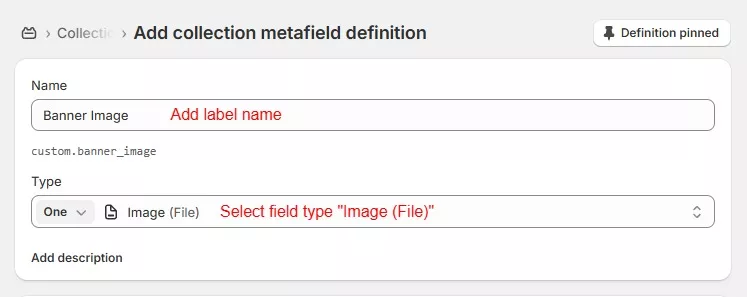
If you would like to use different image for mobile site then create new metafield same as above steps.
Now go to page in store admin and scroll down to metafields section to add image.
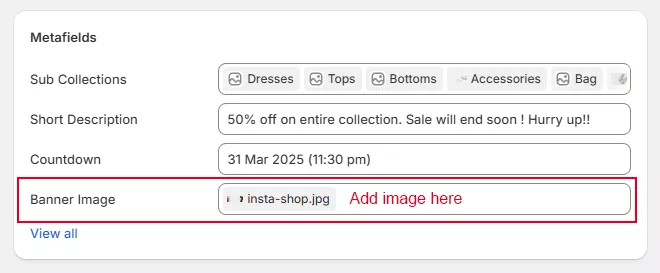
Now go to theme customize > open related page > select page banner section and select metafield using dynamic source button.
Short description #
Go to store admin > Settings > Metafields & Metaobjects > Pages > Add definition
Follow the steps given below to set metafields for image to each page.
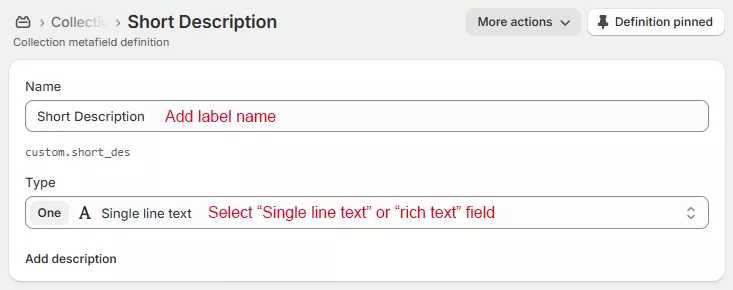
Now go to page in store admin and scroll down to metafields section to add text in short description field.
Now go to theme customize > open related page > select page banner section and select metafield using dynamic source button.