Related product section is available on the product page. There are four method to show products in this section.
Products by collection #
The same collection products are displayed with this option. This option works automatically and finds the first collection assigned to open products and shows products from that collection.
Products by Metafields #
Show specific products as related products. Follow below steps for this method.
Step 1 :
From your shopify store admin > Click Settings > Metafields and metaobjects > Products
Step 2 : Click on “Add definition” button and add data as below
Name: Related Products
Namespace and Key: custom.related_products (Must be same)
Select Content type: (List) Products
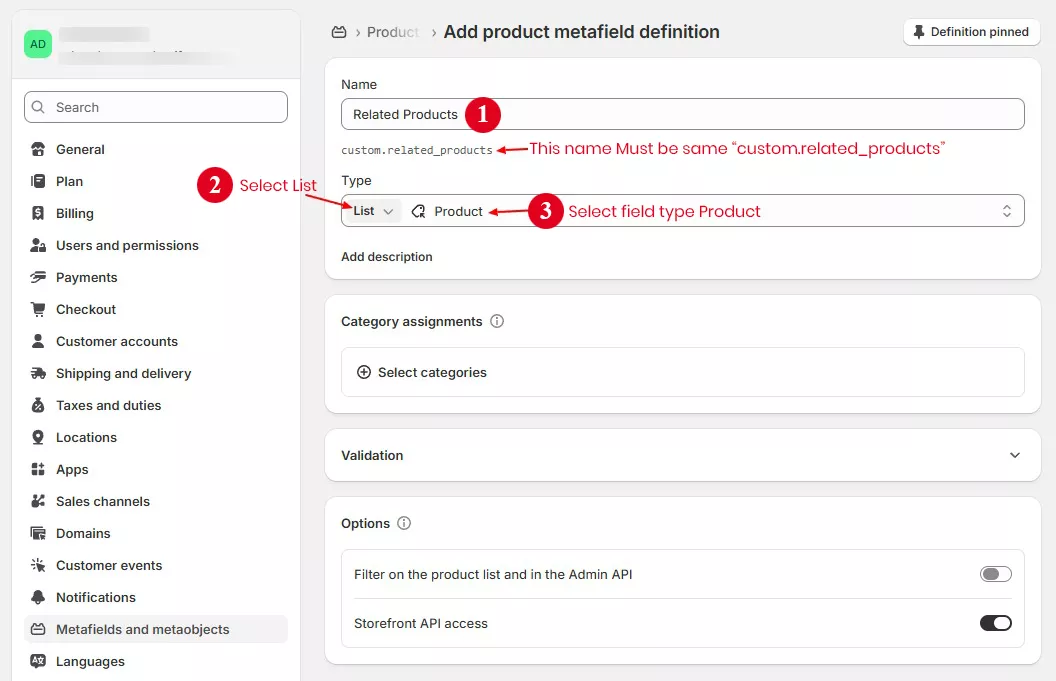
Step 3 : Go to product page in store admin, scroll down to “Product Metafields” section and select products in Related Products field.
Click on Related Products field > select products > Choose the product you want to display on the page, then click the Save button.

Step 4 : Save the product page. Now you can check the product page on the front page.
Products by Product Type #
Products with the same product type show up as related products with this option. You need to assign a product type name to each product.

by Product Vendor(brand) #
Products with same vendor name display as related product with this option. You need to set set vendor name to each products.
