Follow below steps to create metafields for collection page banner image, short description and countdown.
Banner images #
Go to Store Admin –> Settings –> Metafields and metaobjects –> Collections > Add definition
Then add data as below for banner image
Name: Banner Image
Namespace and Key: custom.banner_image (Must be same for theme version 5.x or below)
Select field type: Image (file)
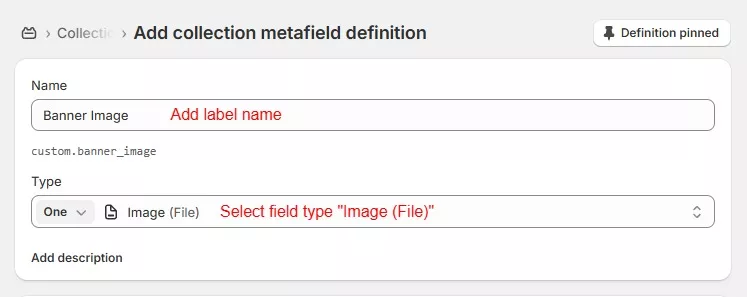
If you like to use different image for mobile site then create new metafield same as above steps but use different names like below
Name: Mobile Banner image
Namespace and Key: custom.mobile_image
Banner short description #
From your Store Admin –> Settings –> Metafields and metaobjects –> Collections -> Add definition
Then add data as below for short description in banner.
Name: Short Description
Namespace and Key: custom.short_des
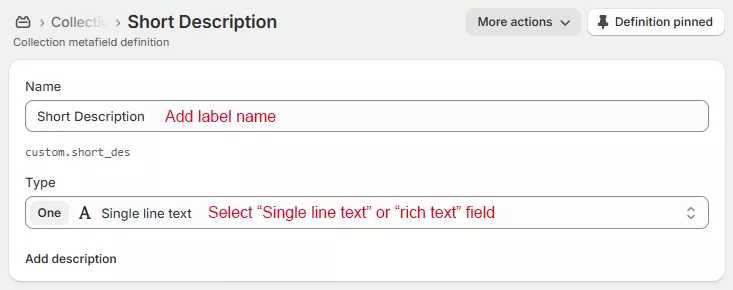
Banner Countdown #
From your Store Admin –> Settings –> Metafields and metaobjects –> Collections -> Add definition
Step 1 : Add data as below for countdown.
Name: Countdown
Namespace and Key: custom.countdown
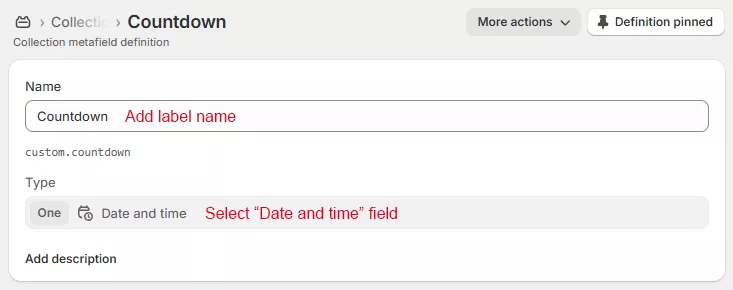
Step 2 : Now open collection page on store admin where need to show banner details and Scroll down to “Metafields”
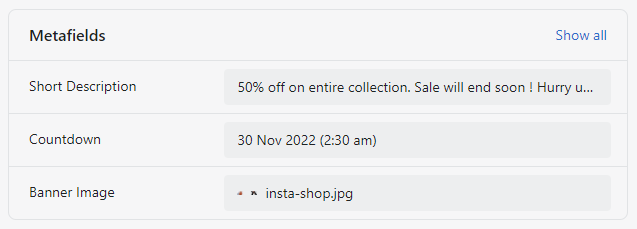
Step 3 : Click on field to add image, text and date then save page after add details.
Step 4 : Now go to theme customize > open collection page template > Select collection banner section
Select metafields entry using dynamic source button. Follow same for description and countdown also.
Save Page. Now you can see details in collection page on store front.