Adorn ThemesAdorn ThemesAdorn Themes
  • Services
  • Themes
    • Avone
    • Revone
    • Vogal
    • Optimal
    • Belle
  • Portfolio
  • Support
    • Open Ticket
    • Knowledge Base
    • Theme Documention
  • Blog
    • Shopify Themes
    • Shopify Apps
    • Ecommerce
    • SEO
  • About us
  • Contact us
Create a Free Store Button

How can we help you?

Theme Installation

  • Avone – How to install theme?
  • Avone Theme Update – Release Notes.
  • Avone – How to update your shopify theme?

Theme Settings

  • How to set free shipping?

Navigation

  • How to use Megamenu Navigation
  • How to display images for mobile menu items?

Collection Page

  • How to set product labels?
  • Set Collection banners, Short description and Countdown by metafields.
  • Collection Page – How to set product filters ?
  • Icon image for collection

Product Page

  • How to set product labels?
  • Add different size chart for each product?
  • Product Page – Product Swatches – Product Variants
  • Set product pre-order for shopify 2.0
  • Related products section
  • Display Complete the look products
  • Display different tab details for each product
  • How to add product custom option?
  • How to display FAQs tab on product detail page?
  • How to set upsell product bundle
  • Add product descriptions with columns.
  • How to display product specification tab on product page?
  • How to display color variant media gallery?

Page Setup

  • Create Custom Page and add sections?
  • How to create Landing page?
  • How to create metafield for page banner

Blog Pages

  • How to show specific product list in blog article page

FAQs

  • Set product pre-order for shopify 2.0
View Categories
  • Home
  • Knowledge Base
  • Avone Shopify Theme
  • Blog Pages
  • How to show specific product list in blog article page

How to show specific product list in blog article page

Please follow the steps below to display products list on blog article page.

Step 1 : From your shopify store admin > Click Settings > Metafields and metaobjects > Blog posts

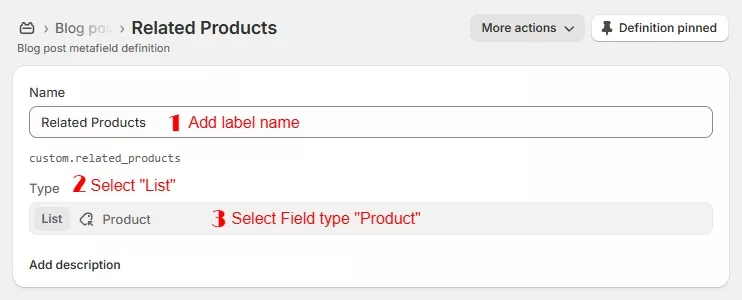
Step 2 : Click on “Add definition” button and add data as below

Name: Related Products
Namespace and Key: custom.related_products (Must be same to same)
Select Content type: Products ( Select “List of products” )


Select List of products and save.


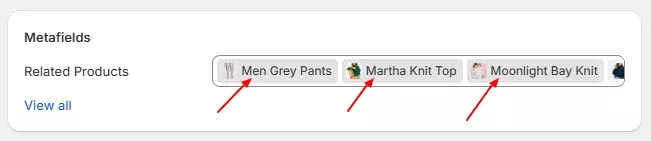
Step 3 : Now go to blog post page, scroll down to “Metafields” and Click on Show all link


Step 4 : Click on Related Products field in open page > select products > select product you like to display in page then click on save button.


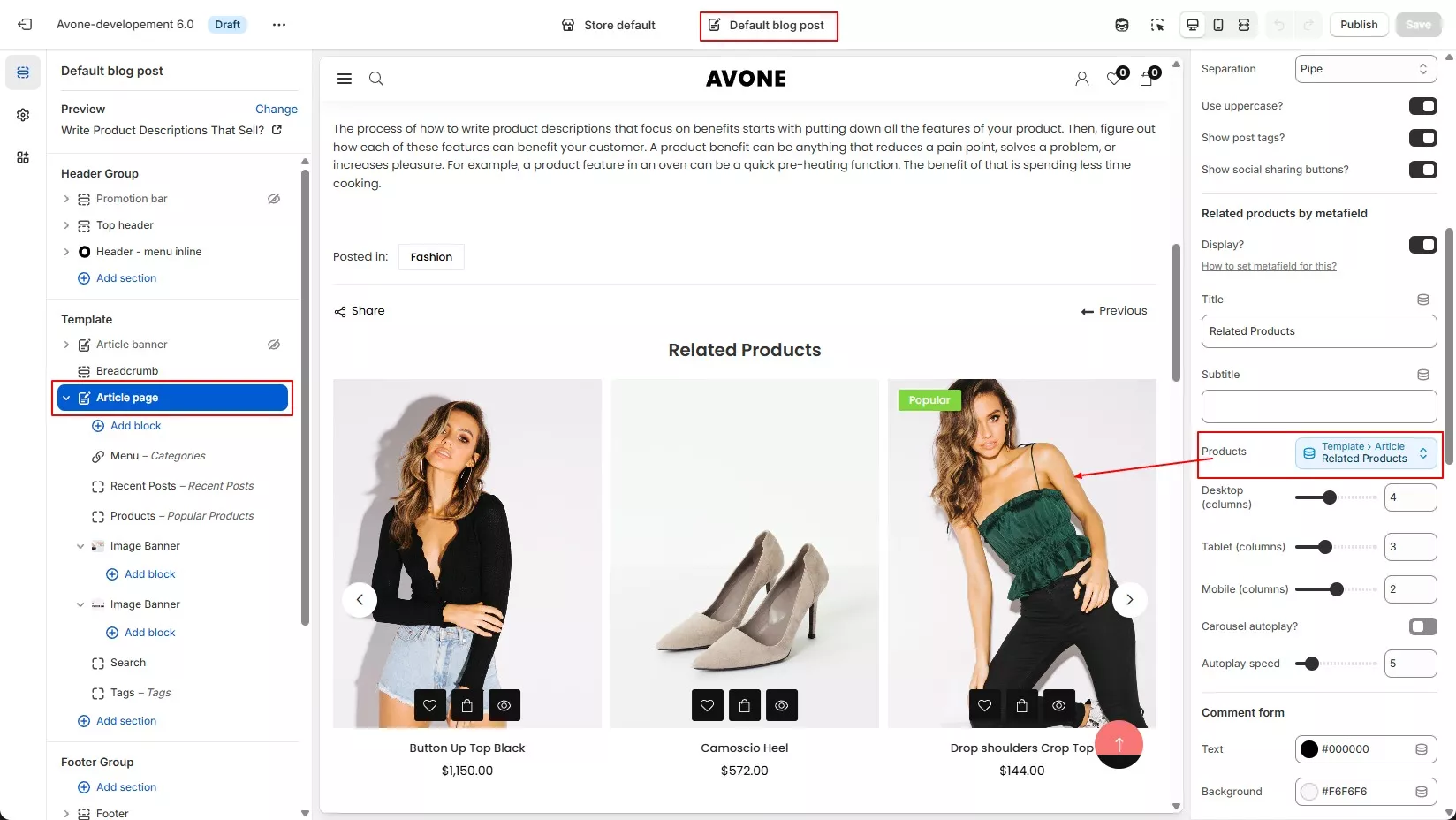
Step 5 : Save article page and check page from front side.

What are your Feelings
Adorn Themes

We build premium shopify themes. Our themes are adored by thousands of merchants for their user-friendly nature, powerful features, reliable performance, and exceptional user interface

Information
  • About Us
  • Contact Us
  • Our Services
  • Our Partners
  • Our Blogs
Customer support
  • Support Ticket
  • Knowledge Base
  • FAQ’s
  • Need Customization?
  • Project Request?
WHY CHOOSE ADORNTHEMES
footer-logo-1
shopify-partner--logo
© 2025 AdornThemes - All Rights Reserved.
  • Social Media
  • Social Media
  • Social Media