Adorn ThemesAdorn ThemesAdorn Themes
  • Services
  • Themes
    • Avone
    • Revone
    • Vogal
    • Optimal
    • Belle
  • Portfolio
  • Support
    • Open Ticket
    • Knowledge Base
    • Theme Documention
  • Blog
    • Shopify Themes
    • Shopify Apps
    • Ecommerce
    • SEO
  • About us
  • Contact us
Create a Free Store Button

How can we help you?

Theme Installation

  • Avone – How to install theme?
  • Avone Theme Update – Release Notes.
  • Avone – How to update your shopify theme?
  • Optimal Theme Update – Release Notes.
  • Optimal – How to update your shopify theme?
  • Vogal Theme Updates List
  • Belle Theme Update – Release Notes.
  • Belle – How to install theme?
  • Install Theme
  • Recommended Apps
  • Changelog
  • Changelog
  • Update Theme

Theme Settings

  • Color swatches trigger
  • Basic Configuration
  • Layout
  • General
  • Typography & Colors
  • Header Menu
  • Cart
  • Search
  • Products Grid
  • Scrolling Text – Products Grid
  • Product Swatches
  • Size Chart
  • Currency & Language
  • Social Media
  • Quickview Popup
  • Animations
  • Age Verification Popup
  • How to add scrolling promotion text within a products grid?
  • How to copy SVG link or code
  • Vogal Theme – Add gift wrapping
  • How to set free shipping?

General Sections

  • Page Sections
  • Header Group
  • Footer Group
  • Overlay Group

Navigation

  • Header Menu
  • Set Menu Labels
  • Show links in Megamenu without column title?
  • How to use Megamenu Navigation
  • How to display images for mobile menu items?

Collection Page

  • How to set product labels?
  • How to add scrolling promotion text within a products grid?
  • Collection Page Banner
  • Collection Banner
  • Sub Collections
  • Sub Collection List
  • How to add collection banner by metafield?
  • Custom image for sub collections
  • Custom image for collections
  • Add product colors using category metafields
  • Collection Main
  • Set custom labels for products
  • Set Collection banners, Short description and Countdown by metafields.
  • Collection Page – How to set product filters ?
  • Display Sub Collection List
  • Icon image for collection
  • Limit color swatch on products grid
  • Scrolling Text – Products Grid

Product Page

  • Color swatches trigger
  • Set custom labels for products
  • How to set product labels?
  • How to add product countdown?
  • Design Product Page
  • Add product colors using category metafields
  • More Color Products
  • Group Products
  • Vogal – Product Metafields
  • Products Bundle / Group Product
  • How to add metafields?
  • Upsell Bundled Products
  • More Color Products
  • Size Chart trigger
  • How to set size chart?
  • Add different size chart for each product?
  • Product Page – Product Swatches – Product Variants
  • Set product pre-order for shopify 2.0
  • Related products section
  • Display Complete the look products
  • Display different tab details for each product
  • How to add product custom option?
  • How to display FAQs tab on product detail page?
  • How to set upsell product bundle
  • Add product descriptions with columns.
  • How to display product specification tab on product page?
  • How to display color variant media gallery?
  • Add external product link?

Page Setup

  • About Us
  • Contact Us
  • FAQs
  • Brands List
  • Lookbook
  • Store Locations
  • Wishlist
  • Blog
  • Create Custom Page and add sections?
  • Cart
  • How to create Landing page?
  • How to create metafield for page banner

Blog Pages

  • Blog
  • Blog Banner
  • How to show specific product list in blog article page

FAQs

  • How to find your purchase code?
  • Login and Create an Account links are not-showing
  • Multiple currencies Setup
  • Show shipping estimated time for specific product
  • Add Instagram Shop Shopify(by Snapppt app)
  • How to create languages menu for weglot?
  • How to add gift wrapping?
  • Display Brand List Page
  • How to add new custom fonts?
  • Add to cart not working
  • How can I change ‘Buy it now’ button text?
  • What’s included with my theme support?
  • Why product recommendations do not showing up in my store?
  • How can I improve the speed score of my store?
  • Troubleshooting Theme issues
  • How to get Instagram Access Token?
  • Add Reviews Code in theme files.
  • How to get MP4 video link?
  • Set product pre-order for shopify 2.0
  • How to add Product subtitle?
  • How to hide section on mobile or desktop?
View Categories
  • Home
  • Knowledge Base
  • FAQs
  • Login and Create an Account links are not-showing

Login and Create an Account links are not-showing

To address the issue of the “Login” and “Create an Account” links not displaying, and to ensure smooth access to your customer account features, follow these steps to ensure their visibility on your shopify store:

Go to Store Admin >> Settings >>  Customer accounts

Active “Show login links” to active customer account option on your store and display link or button in site.
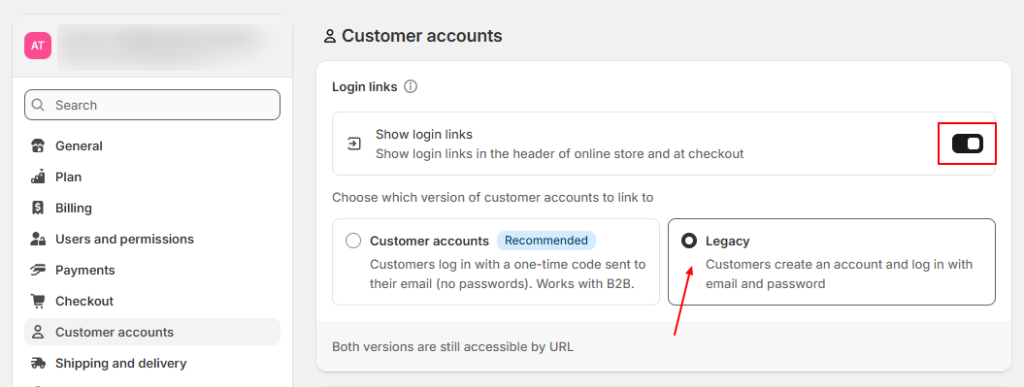
Active customer account on shopify site

You can choose between “New Customer Accounts” or “Legacy Customer Accounts” when linking to your online store and checkout.

Choosing between New and Legacy Customer Accounts: #

New Customer Accounts: #

This is the modern version of customer accounts in Shopify. It offers a more streamlined and feature-rich experience. It also supports UI extensions and can be further customized.

Legacy Customer Accounts: #

This is the older version, which allows customers to log in with an email and password.

What are your Feelings
Table of Contents
  • Choosing between New and Legacy Customer Accounts:
    • New Customer Accounts:
    • Legacy Customer Accounts:
Adorn Themes

We build premium shopify themes. Our themes are adored by thousands of merchants for their user-friendly nature, powerful features, reliable performance, and exceptional user interface

Information
  • About Us
  • Contact Us
  • Our Services
  • Our Partners
  • Our Blogs
Customer support
  • Support Ticket
  • Knowledge Base
  • FAQ’s
  • Need Customization?
  • Project Request?
WHY CHOOSE ADORNTHEMES
footer-logo-1
shopify-partner--logo
© 2025 AdornThemes - All Rights Reserved.
  • Social Media
  • Social Media
  • Social Media